WordPress Asking For FTP Credentials To Install Plugins
Thangaraja Palaniappan (Author) Published Date : Jun 09, 2019 05:30 ISTTechnology
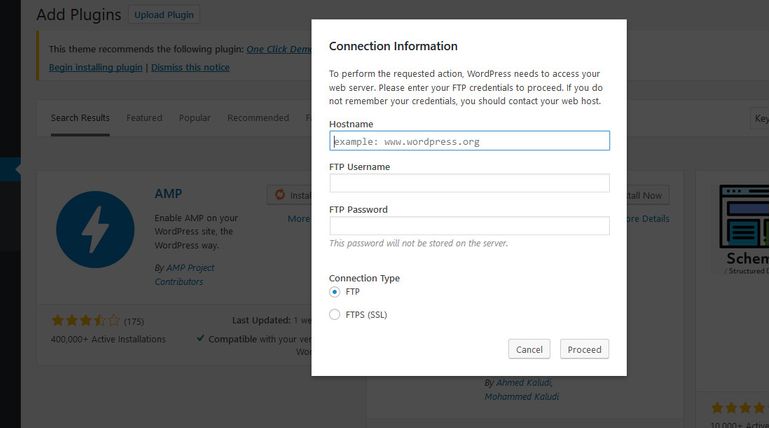
WordPress Asking For FTP Credentials To Install Plugins?
When WordPress CMS software is installed in a restricted access method in any kind of servers, installing NEW plugins or Updating new plugins need permission to access your WordPress folder in your server. This is likely to be secured CMS system without allowing external sources to access your scripts.Since WordPress is meant to be a free software which needs regular updates, we need to provide folder access permission to do regular updates and even updates to Plugins and themes. This kind of issue will not come in shared hosting but when we move into Cloud server or Ubuntu Servers, we need to provide access permission. Many people could feel it as Error, but it is not! We can solve this issue in two methods, adding a line to the config file or by providing access command in SSH Terminal.
How to Fix WordPress Asking FTP Login details |
|
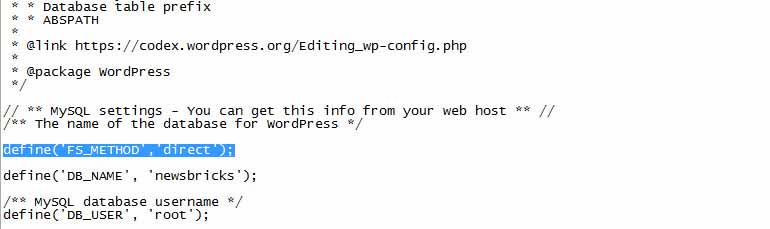
With the help of FTP software like Filezilla or WinSCP, login into your WordPress folders and edit wp-config.php file and insert the following line anywhere in the script define('FS_METHOD','direct'); as explained in image.
Solve by Method 2:
Launch your SSH terminal from our cloud server or using Putty and execute following line sudo chown -R www-data /var/www/html which enables root permission to WordPress or any other scripts inside HTML folder.
Note: Giving complete full access to HTML folder is not advisable, once all your updates are done, its better to reverse permission to restricted access by executing following command in SSH terminal sudo chown -R root /var/www/html this command will lock access to your web folders for security.
Also read: 4 SSDs into One - Gigabyte Imagine the Speed of PC